"Ukrposhta API" - delivery module for OpenCart
Ukrposhta is the national postal operator of Ukraine. Let's consider the main advantages that can be offered to your clients with this delivery method:
- expanding sales geography - 11000+ pick-up points for your goods and attracting audiences from small towns and villages
- shipping parcels weighing from 250 grams - only Ukrposhta allows you to send parcels weighing from 250 grams at a favorable price
- parcel processing without volumetric weight accounting - only actual weight and the length of the longest side are considered
- rates - up to 30% lower than the market average
This module is the most functional solution for organizing Ukrposhta delivery in your online store, using the E-COMMERCE API. The module is a great assistant when working with orders for which the client has chosen Ukrposhta delivery. In addition to the standard delivery module functions, there are tools for working with Invoices. There are also two calculators available: cost calculation and delivery time calculation. Cost calculation is based on the API, ensuring accurate data. The module includes several features that automate daily routine tasks: invoice number notifications, order status changes, reminders about unclaimed parcels, and more. The capabilities are constantly expanding and improving.
Using this module, you will save time and significant money on order processing. Clients who use the Ukrposhta API receive a 5% discount on shipments, so with regular shipments, the module will pay off within a month and start saving you money.
This module is an original development and is protected by appropriate rights.
Use the links below to visit the demo site. To access the admin panel, use the following credentials: login and password - demo
Description (main information)
Main features
- a large number of settings
- creation, editing, and deletion of invoices
- automatic filling of the invoice form
- downloading, printing setup, and printing of invoices
- automatic shipment tracking, order status changes, and notifications
- the most accurate preliminary cost calculation
- estimated delivery time calculation
- automatic calculation of shipment parameters
Administrator features
- multi-store support
- export/import settings
- loading basic settings
- enable/disable debug mode
- input eCom Bearer, StatusTracking Bearer, and User token values of Ukrposhta
- uploading the transport company's logo
- choosing the logo display location
- configuring cURL connection and execution timeout
- delivery methods settings (Express to branch, Express by courier, Standard to branch, Standard by courier):
- enable/disable delivery method
- editable multilingual delivery name
- choosing the geographical zone
- choosing the tax class
- setting the minimum order amount for which delivery will be available
- setting the maximum order amount for which delivery will be available
- setting the minimum order amount for which delivery will be free
- editable multilingual free delivery text
- enable/disable delivery cost calculation
- enable/disable API cost calculation (used information for calculation: delivery type, sender's and recipient's postal codes, product cost, product weight, maximum side, registered letter)
- enable/disable tariff cost calculation (can be used independently or if the API is unavailable. Used information for calculation: sender's and recipient's region, delivery type, product cost, product weight)
- enable/disable delivery time calculation in days (used information for calculation: sender's and recipient's region, delivery type)
- choosing the branch type
- choosing the branch status
- setting tariffs and delivery times
- working with the database:
- uploading/updating postal company directories
- uploading/updating regions of Ukraine
- uploading/updating settlements of Ukrposhta
- uploading/updating branches of Ukrposhta
- configuring sender parameters: sender, sender type, tax number, EDRPOU, bank code, bank account, email, phone, region, city, street, house, apartment, postal code, address pickup
- configuring recipient parameters: recipient, recipient type, tax number, EDRPOU, phone, region, city, address, street, house, apartment, postal code
- configuring shipment parameters:
- enable/disable volume accounting
- choosing the volume accounting option
- setting the default number of places
- choosing the components for the declared value of the shipment
- setting the default declared value
- setting the minimum declared value
- setting the default description of the shipment as a template using order and product macros
- enable/disable registered letter
- enable/disable SMS notification of the shipment arrival to the client
- choosing the action in case of non-delivery
- choosing the default parameter application method
- setting the default weight
- setting the minimum weight
- setting the default dimensions
- setting tolerances for shipment dimensions
- configuring payment parameters:
- choosing the default payer of delivery
- choosing the payment method for COD
- setting the calculation of COD
- setting the accounting of commission for declared value
- choosing the default payer of return delivery
- choosing the method of receiving money transfer
- configuring TTN integration:
- enable/disable default bonus shipments
- choosing the displayed information in the invoice list
- setting up printing
- choosing a compatible delivery method for creating invoices
- enable/disable creation, editing, deletion, and assignment of invoices in the order
- setting multilingual menu item names for working with invoices in the order
- Cron tasks:
- setting the security key for executing Cron commands
- automatic module database update (directories, regions, cities, branches)
- automatic shipment tracking, order status change, and notifications
- choosing order statuses for tracking
- configuring dependencies for each shipment status and order status in the store
- setting the execution delay for each shipment status
- enable/disable notifications for the administrator and the customer
- setting a multilingual message template for email and SMS notifications using order, product, and invoice macros
- and other standard delivery module options
Invoice management features
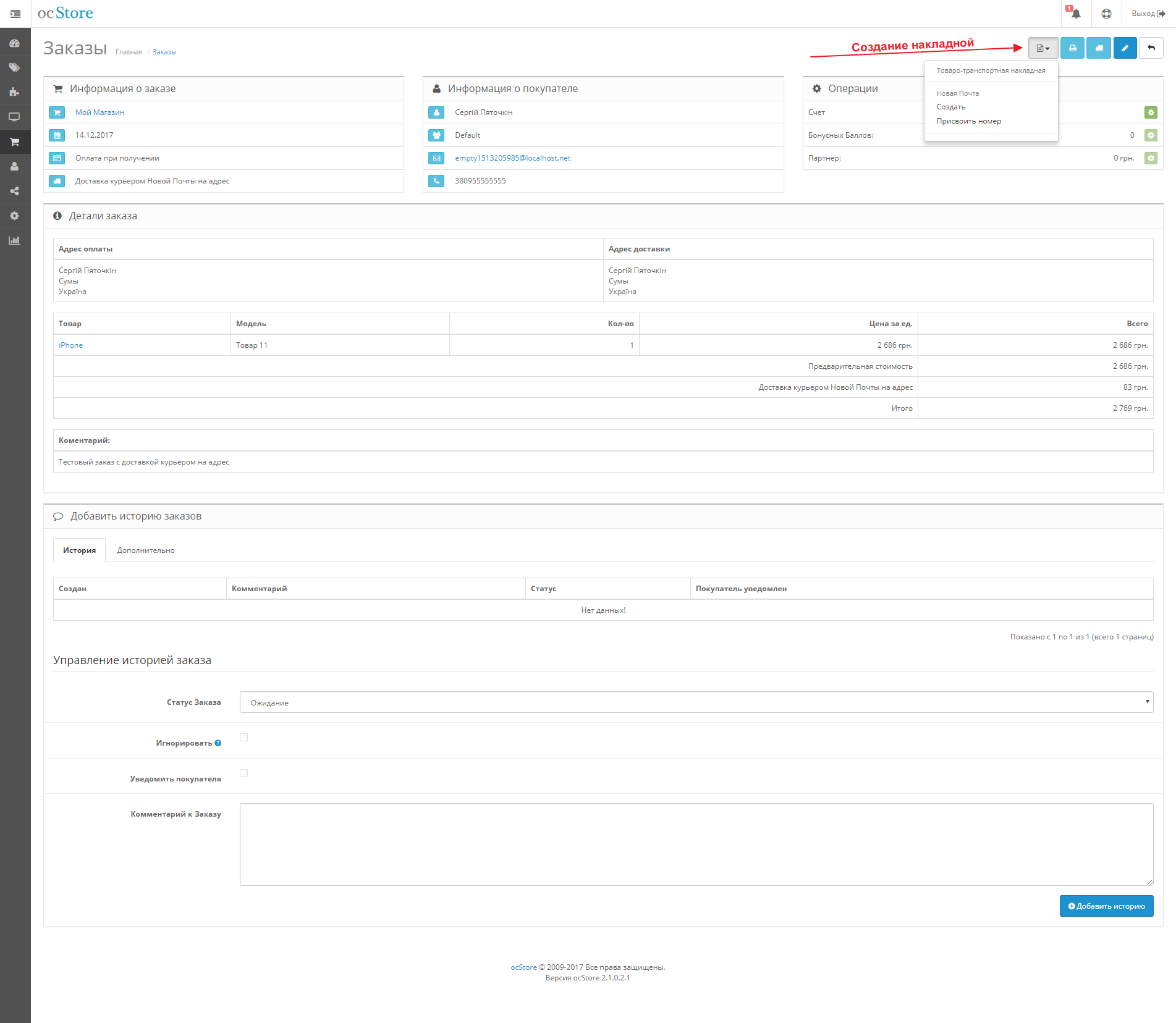
When viewing an order in the admin panel, if the client chose a compatible delivery method, a button for working with the invoice appears. It is possible to create an invoice based on the order or assign an existing one. When creating, the module fills out the form as much as possible automatically. If an invoice has already been created for the viewed order, the editing and deletion options will be available. You can also go to the list of all invoices when viewing orders. Available functionalities:
- creation, editing, and deletion of invoices
- adding/removing invoices to/from a group
- setting up invoice printing
- downloading the invoice and other accompanying documents in PDF format
- viewing the invoice list with the ability to filter by invoice and order number
- automatic filling of sender information according to the selected module settings with the possibility of data change directly before creating the invoice
- automatic filling of recipient parameters according to the order data, including the following functions:
- enable/disable bonus shipment
- choosing the delivery method (express or standard)
- choosing the delivery type (branch or address)
- loading recipient data by phone number
- choosing the recipient type
- input of the tax number
- input of the EDRPOU code
- input of the delivery address (region, city, branch, street, house, apartment, and postal code)
- automatic filling of shipment parameters:
- weight
- dimensions
- possibility to set several places
- declared value with the possibility of adjusting the components
- description
- automatic filling of payment parameters:
- delivery payer
- return delivery amount if COD is chosen
- return delivery payer
- method of receiving money transfer
- additional shipment parameters:
- registered letter
- inspection upon delivery
- SMS notification to the client about the arrival of the shipment
- action in case of non-delivery
- fields are automatically filled by the module as much as possible according to the settings
- field validation during editing and before sending data to the postal company's server
- automatic verification of the client's existence in the database and creation if the result is negative
- automatic editing of the client's data
- automatic search for recipient addresses and creation of new ones if necessary
Upon successful creation or editing, there will be a redirection to the invoice with its highlighting in the general list.
Client features
- choosing the delivery type:
- Ukrposhta Express. Delivery to branch
- Ukrposhta Express. Delivery by courier to address
- Ukrposhta Standard. Delivery to branch
- Ukrposhta Standard. Delivery by courier to address
- specifying the delivery address
- choosing the receiving settlement:
- drop-down list
- search by city name
- choosing the branch:
- drop-down list
- search by index
- index search
- information about delivery cost
- information about delivery time
- Ukrainian
- Russian
- English
The API methods support the Ukrainian language and partially English. The module automatically uses the necessary language depending on the OpenCart settings or the customer's preferences during the order process.
- OpenCart v. 1.5.x.x, 2.x.x.x, 3.x.x.x (and builds based on the corresponding OpenCart versions)
- checkout forms: One Page Checkout - Simple Checkout, OCTemplates Smart Checkout, Simple checkout & registration - maximum functionality. Standard checkout, Ajax Quick Checkout - only city and branch selection
- message sending modules: standard email sending, SmsFly order
- order editors: Order Manager (Order Editor)
Adaptation may be required for specific versions. Adaptation for other modules and templates can be done upon request for an ADDITIONAL FEE.
- By purchasing the module, you get lifetime access to free updates and free technical support for a year
- The license is valid for one domain and all its subdomains, as well as test sites
- Information on how to obtain the license is available after the module installation
- The license activation occurs within a few hours after purchase
- ionCube Loader version 5.0 and higher
- PHP cURL library
- PHP version 5.6 and higher
Instructions (installation, setup, update, and removal)
- Upload the contents of the upload folder to the root of the site
- Go to Extensions → Installer and upload the necessary modifier from the modification folder. Go to Extensions → Modifications and click the "Refresh" button. More about modifiers in the Setup section
- Log in to the store admin panel and go to Extensions → Shipping and click the "Install" button next to the module
-
Go to the module settings and activate the license
After sending the purchase data, a message should appear stating that the data was successfully sent!After activating the license, a confirmation message should appear!
- On the "General" tab in the "eCom Bearer", "StatusTracking Bearer", and "User token" fields, enter the corresponding values that will be generated and provided to you after signing the contract with "Ukrposhta"
- Open the drop-down list next to the save settings button and load the basic settings
- Set the necessary settings on all tabs
- Save the settings by clicking "Save". The module is ready for use
The module is compatible with almost all popular order processing modules and OpenCart templates thanks to the appropriate modifiers. For the full operation on the checkout page, the following minimum requirements for delivery address fields must be met:
- Region (zone_id) - standard OpenCart "select" field
- City (city) - standard OpenCart text field
- Address (address_1/address_2) - standard OpenCart text field for entering the address with a comma
- Postcode (postcode) - standard OpenCart text field
If the used checkout module allows creating custom fields for the delivery address, it is possible to use separate fields for the street, house, and apartment.
Description of modifiers:
shippingdata_admin – mandatory modifier necessary to expand functionality in the admin panel.
shippingdata_ajax_quick_checkout – the modifier ensures compatibility with the Ajax Quick Checkout module. Additional configuration is not required. Adaptation may be required for specific versions.
shippingdata_default_checkout – the modifier ensures compatibility with the standard checkout form. Additional configuration is not required. The modifier replaces the "Company" field in the address with a checkbox allowing pre-selection of delivery. If the checkbox is checked, the city and address fields load lists of cities and branches respectively.
shippingdata_octemplates_smart_checkout – the modifier ensures compatibility with the Smart Checkout module of the Deals template. Additional configuration is not required. Adaptation may be required for specific versions.
shippingdata_simple – the modifier ensures compatibility with the Simple checkout and registration module. There are two configuration options:
- Displaying the city and branch as simple text fields with drop-down lists. To configure, it is enough to enable reloading for the city and address_1 fields in the Simple module settings and display the corresponding fields in the delivery address block.
- Displaying the city and branch as drop-down select lists. This compatibility method is available for Simple versions where it is possible to set the retrieval of values by calling a method from catalog/model/tool/simpleapimain.php or catalog/model/tool/simpleapicustom.php.
Setup:
- after installing the shippingdata_simple modifier, go to the Simple module settings and select the "Fields" section
- for the city selection field, set the following settings:
- type – select
- Value list – Retrieve by calling a method in the module API (catalog/model/tool/simpleapimain.php) or (catalog/model/tool/simpleapicustom.php)
- API module method name – getShippingCities
- Pass the value of another field to the method – Region
- for the branch selection field, set the following settings:
- type – select
- Value list – Retrieve by calling a method in the module API (catalog/model/tool/simpleapimain.php) or (catalog/model/tool/simpleapicustom.php)
- API module method name – getShippingDepartments
- Pass the value of another field to the method – City
- all other settings are standard. Field names may vary.
shippingdata_simple_v_2.X.X / shippingdata_simple_v_3.X.X – the modifier ensures compatibility with the Simple checkout module of the corresponding versions. For the city and address_1 fields in the settings, it is necessary to enable reloading. Adaptation may be required for specific versions.
- Log in to the store admin panel
- Go to the module settings and export the settings (drop-down menu next to the "Save" button)
- Go to Extensions → Shipping and click the "Uninstall" button next to the module
- Upload the contents of the upload folder to the root of the site using an FTP manager, replacing the existing files
- Upload new modifiers after deleting all old ones (Shipping Data ...) and refresh the modification cache (click "Refresh"). More about modifiers in the Setup section
- Go to Extensions → Shipping and click the "Install" button next to the module
- Go to the module settings and on the "General" tab, enter the access keys to the Ukrposhta API in the fields "eCom Bearer", "StatusTracking Bearer", and "User token"
- After loading the database, import the previously saved settings (drop-down menu next to the "Save" button)
- Check the correctness of all settings and click the "Save" button
- Log in to the store admin panel
- Go to Extensions → Modifications and delete the installed module modifiers (select and click "Delete"), then refresh the modification cache (click "Refresh")
- Go to Extensions → Shipping and click the "Uninstall" button next to the module (this will remove the module information from the database)
- Delete the module files from the server
Support (FAQ, changelog, contacts)
Following the instructions, install the extension on the domain for which you want to get a license. Then, go to the module settings, fill out, and send the purchase information. After verifying the purchase, the module will be activated automatically and an activation key will be sent to your email.
For test sites and subdomains, the key is provided for free. Test domains can be specified with a comma during the activation of the main or vice versa.
Update the ionCube Loader version.
Install/activate the free ionCube Loader library on your server/hosting. If, for example, in php_info, it shows that the library is installed but the error persists, it means you have incorrectly installed ionCube Loader.
- check if all module files were uploaded to the root directory of your online store
- check if your server parameters meet the module requirements
- check the server and OpenCart error logs for specific error details
- check if there are errors in the modification logs
- check if the "Shipping Cost" switch is set to "Yes"
- check "Free shipping from", maybe the amount in your cart is equal to or greater than the amount for free shipping
- check the weight of the item in the cart. If the weight is missing in the product card, you can set a default value in the module settings
- check the module settings and the correctness of the recipient's data
- sometimes some API methods of the postal company are unavailable, in this case, you can enable the tariff calculation in the module settings to display an approximate shipping cost or wait for the API to be restored
- check if there are errors in the modification logs
- check if the "Delivery time" switch is set to "Yes"
- check the module settings and the correctness of the recipient's data
- sometimes some API methods of the postal company are unavailable, in this case, you need to wait for the API to be restored
-
In the extra folder, there is a dump of countries and regions recovery_zone_and_country_tables_ru.sql and recovery_zone_and_country_tables_ua.sql with correct names for Ukraine, in Russian and Ukrainian respectively. They need to be uploaded through the store admin panel in the System → Tools → Backup / Restore section after checking the table prefixes, in the files they are oc_.
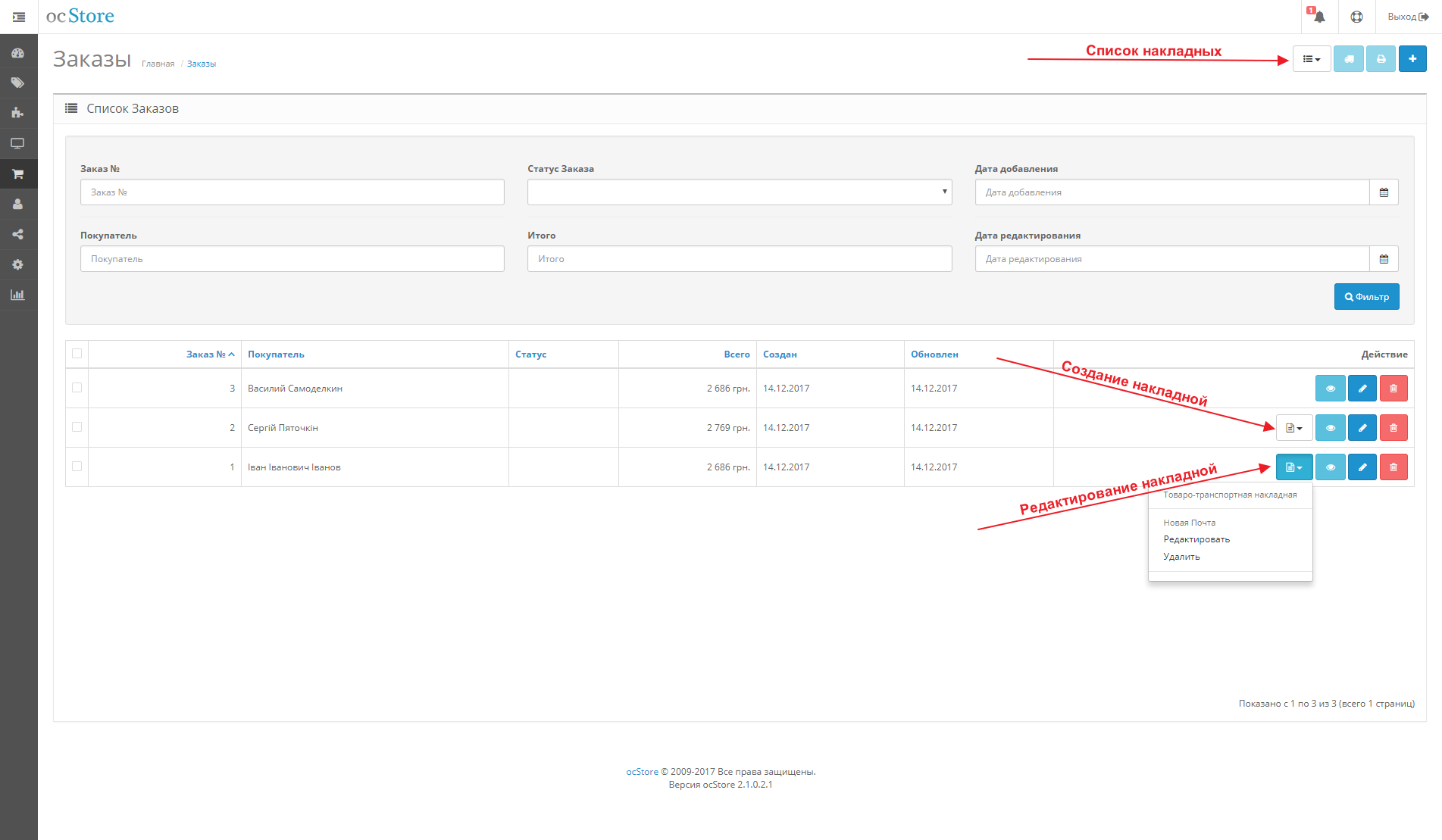
If a compatible shipping method was selected during the order placement, a button for working with the waybill will be available when viewing the order list or a specific order. Also, when viewing the order list, there will be a button to go to the waybill list.
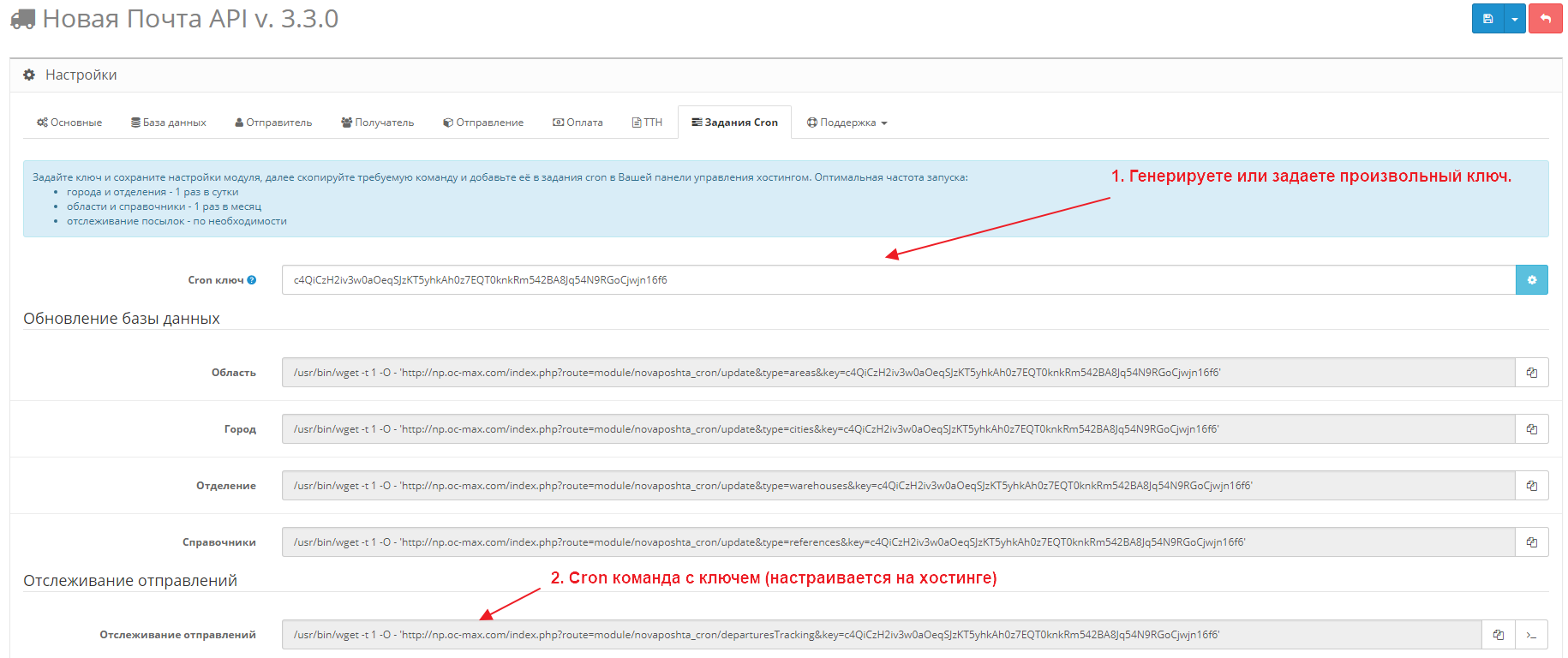
Tracking in the module is carried out through the appropriate methods of the Ukrposhta API interface. Everything works on the principle of status changes. For better understanding, let's consider the work and setup on a specific example. Suppose we need to send a notification to the client with the waybill number when the order is shipped and complete the deal by setting the corresponding status "Deal completed".
- First, you need to set up Cron using the command in the module. The Cron command is given as an example and may differ for different hostings. Tracking interval, for example, every hour.
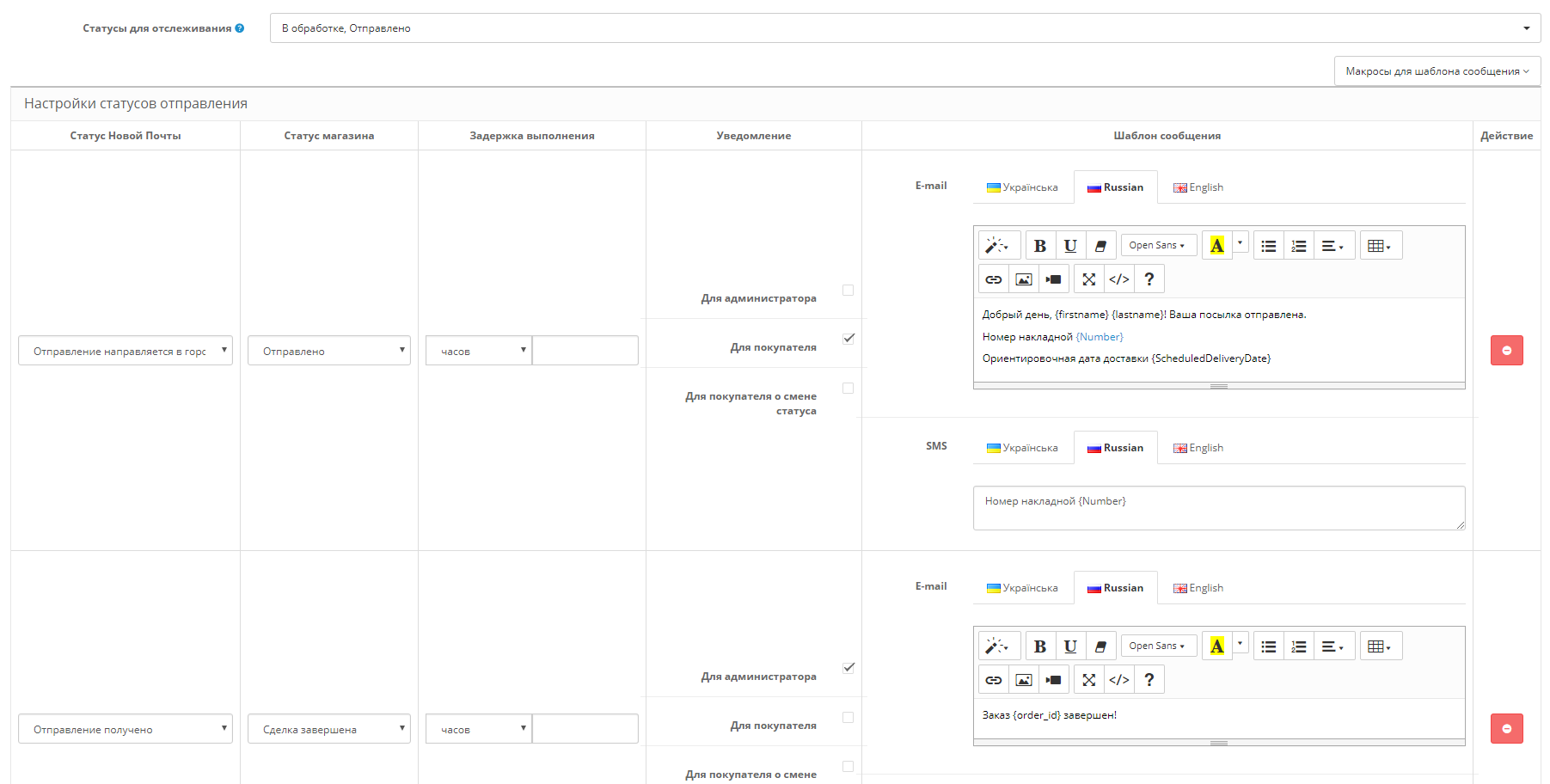
Cron command for tracking - Specify the statuses of your online store that will be tracked. The module will track orders with those statuses that you mark and for which a waybill will be created. For our example, this is "Processing" and "Shipped".
- Set up the correspondence between Ukrposhta statuses and your online store statuses. The module checks the current status of the shipment with the corresponding store status, if the order status does not match, the module changes it to a new one. For our example, the module will work as follows:
- Selects all orders that have a waybill number and a status that matches "Processing" and "Shipped"
- Tracks the selected orders by waybill number
- If the store status of a specific order is "Processing", and the status in the Ukrposhta system has become "Shipment", the module changes the store status to "Shipped"
- If the store status of a specific order is "Shipped" or "Processing", and the status in the Ukrposhta system has become "Delivered", the module changes the store status to "Deal completed"
Status setup
- added support for PHP 8.0, 8.1, 8.2
- added support for OpenCart 3.0.3.9
- added printing of multiple documents
- added tariff calculation for cash on delivery
- added default minimum weight
- added default minimum declared value
- added ability to enable/disable insurance calculation in shipping cost
- added product_id macro support for products
- added tooltip for the specified city and department in the TTN form
- optimized loading of settings and TTN form
- updated API methods
- fixed errors loading city and department databases
- fixed errors filling out the TTN form
- fixed default number of places
- fixed compatibility issues
- other bug fixes, minor tweaks, and improvements
- added department type setting
- added department status setting
- added zip code search
- updated tariff calculation
- optimized working with the waybill list
- fixed errors when creating and editing TTNs
- fixed compatibility issues
- other bug fixes, minor tweaks, and improvements
- added support for bonus shipments
- added search for settlements
- added department search
- added cURL timeout settings
- added support for PHP 7.4
- refined tariff calculation
- optimized working with the waybill list
- optimized working with the database
- updated API methods
- fixed errors when creating and editing TTNs
- fixed delivery method sorting error
- fixed compatibility issues
- other bug fixes, minor tweaks, and improvements
- added support for OpenCart 3
- added working with groups of postal items
- added printing of form 103a
- added printing of address labels for a group of shipments
- added registered letter option
- added inspection setting upon delivery
- added setting for actions in case of non-delivery
- added ability to manually create/edit the sender
- added recipient and sender search by phone number
- added validation of API shipping cost calculation
- added support for IBAN account number
- added multi-store support when creating TTNs
- added support for product option macros
- added support for earlier cURL versions
- added caching for a number of API requests
- optimized display of the waybill list
- completely changed the functionality for working with customers
- all API methods have been updated
- increased limits for cURL requests
- updated status list for shipment tracking
- expanded settings for printing accompanying documents
- fixed recipient address parser error
- fixed error determining cash on delivery when creating a waybill
- fixed debugging mode errors
- fixed number operations errors in PHP 7.1 and higher
- fixed saving settings for multi-stores
- fixed validation errors in the waybill form
- fixed errors determining free shipping and min./max. cart values for various currency settings
- fixed tariff calculation errors
- fixed errors determining parcel parameters
- fixed various order processing errors
- fixed compatibility errors with different OpenCart builds
- improved compatibility with a number of extensions
- other bug fixes, minor tweaks, and improvements
- added API shipping cost calculation
- added cash on delivery to bank account
- added automatic editing of customer data
- added customer fields (TIN, bank code, account number, email)
- added support for OpenCart v 2.0.0.0-2.2.0.0
- added adaptation for OpenCart v 1.5.X.X
- fixed shipment parameter calculation
- fixed StatusTracking Bearer check
- other bug fixes, minor tweaks, and improvements
- first release
- Telegram (preferred communication channel)
- ocmax.helper@gmail.com
- oc-max.com